# Overview

All API Documentation for all games/servers created by NoVariety Games are stored here

<table><thead><tr><th>Game</th><th>Documentation</th><th data-hidden></th></tr></thead><tbody><tr><td>ROBLOS</td><td><a data-mention href="/roblos-documentation/terminal-language">ROBLOS Documentation</a></td><td></td></tr><tr><td>ROBLOS - Website Builder</td><td><a data-mention href="/websitecreator/appinstaller-files">ROBLOS Website Creator</a></td><td></td></tr><tr><td></td><td></td><td></td></tr></tbody></table>


# Terminal Language

{% hint style="danger" %}
Some Basic LUA functions may not work, they will be added in the feature.
{% endhint %}

Welcome! Here is some WIP documentation of the Terminal in ROBLOS

Terminal commands are created using the vanilla version of Lua

Here is an example of the $$ls$$ command

```lua
--#DESCRIPTION: Displays a list of files and subdirectories in a directory\nUsage: ls
modules.echo.off()
local folders = modules.folder.getFolder(modules.folder.getDir())
local stuff = {}
for name,_ in pairs(folders) do
	table.insert(stuff,name)
end
modules.echo.on()
	
print(table.concat(stuff,","))
```

## So what is going on?

All programs must start with a description, to start your first program go to the notepad and start it off with the code below.

```lua
--#DESCRIPTION: Explain what your program does
```

Next let's get used to our tools

There is a new global variable called $$modules$$&#x20;

These variables allow you to interact with the OS, some examples could be getting the current directory and changing it as well.

Current Modules Implemented&#x20;

#### Folder Modules

```lua
modules.folder.isValid(path: String): Boolean
-- Checks if path is a valid Path not if it exist.

modules.folder.changeDir(path: String): Void
--Changes terminal directory

modules.folder.getDir(): String
-- Return current Directory path

modules.folder.getFolder(path: String): Table
-- Returns all content within that path as a table, this includes the metadata of that current file

modules.folder.copy(filePath: String, NewPath: String): Boolean
-- Copy a file NOT A DIRECTORY to a new path

```

#### Echo Module

<pre class="language-lua"><code class="lang-lua"><strong>modules.echo.off()
</strong>-- Disables any print,warn,usage,error function

modules.echo.on()
-- Enables all print,warn,usage,error function

modules.echo.off()
-- Disables any print,warn,usage,error function

modules.echo.toggle()
-- Toggles all print,warn,usage,error function

modules.echo.force()
-- Force any print,warn,usage,error to be enabled or disabled function


</code></pre>

Now you know, the basics of the terminal language.&#x20;

As of now this is still a WIP and more modules are getting added along with more commands. This documentation will be changed to include more information but of now.

That's all folks!


# Coding Language


# AppInstaller Files

This requires the user to be updated to ROBLOS v1.0.4

The `.appinstaller` file is used to prompt a user to download an application from the [App Store](https://application.novarietygames.xyz)

<figure><img src="https://2295821271-files.gitbook.io/~/files/v0/b/gitbook-x-prod.appspot.com/o/spaces%2F9SVj4yT08iqyEeDz1LFg%2Fuploads%2FaiUg3z6uMfVSylXp7bFk%2Fimage_2024-04-06_114941988.png?alt=media&amp;token=18721dcf-6cab-4221-96ba-cb38725abaff" alt=""><figcaption><p>The Install prompt for the app</p></figcaption></figure>

Here is some example `.appinstaller` xml.

```xml
<AppInstaller id="APPLICATION_ID" publisher="APPINSTALLER_PUBLISHER" version="APPINSTALLER_VERSION">
<Title>APP_TITLE</Title>
<Description>APP_DESCRIPTION</description>
<Capabilities> <FLAG>FLAGS</FLAG> </Capabilities>
</AppInstaller>
```

Capabilities Flags

```
READ_STORAGE: Read System Storage
SYSTEM_RESOURCES: Uses system resources
RAAD_REGISTRY: Read Registry entries
WRITE_REGISTRY: Write registry entries
DEFINE_POLICIES: (Not used)
```

The AppInstaller Attributes include id, publisher, and version. This is what appears on the application prompt. Not on the actual applicaton.

AppInstaller.id = Application ID off of <https://application.novarietygames.xyz> (This is the app ID that you want to install)\
AppInstaller.publisher = The application prompt publisher \
AppInstaller.version= The application prompt version\
AppInstaller.Capabilities= What is the application going to do? Does it access certain places. Let the user know what this application does

The more info button gives the application information from app store.

Once you have created your xml file, you can now use [commit](/websitecreator/luascript/download/commit) to prompt the user to download the application.


# HTML Interpreter

{% hint style="danger" %}
Not all HTML code will work with this interpreter
{% endhint %}

{% hint style="warning" %}
This documentation will not include CSS
{% endhint %}

Most HTML code will work with this custom built interpreter, Not everything will because of the way it was built

Code some HTML the same way you would create a website on the web

Here is some **example** HTML code

<pre class="language-html"><code class="lang-html">&#x3C;html name="action" t="poop">
Create data attributes by just including the key equal to value in the tag
&#x3C;body id="id" action="test">

There are no style attributes at the moment. You need to use CSS
&#x3C;p id="test">This site is built entirely with HTML with the new custom HTML compiler. You can even use CSS with it!&#x3C;/p>
<strong>
</strong><strong>Anything not in a tag is a comment and will NOT BE READ BY THE Interpreter
</strong><strong>
</strong><strong>For CSS classes use className instead of Class
</strong>&#x3C;p className="class">class&#x3C;/p>

Instead of JS scripts, it is now LUA scripts!
Some cool example code, better explained in the LUAScript section
<strong>&#x3C;script src="main.lscript">&#x3C;/script>
</strong>&#x3C;/body>
&#x3C;/html>
</code></pre>

So far here are all the valid tags

<table><thead><tr><th>Tag</th><th data-hidden>Roblox Element</th><th data-hidden></th></tr></thead><tbody><tr><td>html</td><td>frame</td><td></td></tr><tr><td>head</td><td>frame</td><td></td></tr><tr><td>body</td><td></td><td></td></tr><tr><td>div</td><td></td><td></td></tr><tr><td>span</td><td></td><td></td></tr><tr><td>p</td><td></td><td></td></tr><tr><td>h1</td><td></td><td></td></tr><tr><td>h2</td><td></td><td></td></tr><tr><td>h3</td><td></td><td></td></tr><tr><td>h4</td><td></td><td></td></tr><tr><td>label</td><td></td><td></td></tr><tr><td>input</td><td></td><td></td></tr><tr><td>textarea</td><td></td><td></td></tr><tr><td>button</td><td></td><td></td></tr><tr><td>a</td><td></td><td></td></tr><tr><td>img</td><td></td><td></td></tr><tr><td>ul</td><td></td><td></td></tr><tr><td>ol</td><td></td><td></td></tr><tr><td>li</td><td></td><td></td></tr><tr><td>table</td><td></td><td></td></tr><tr><td>tr</td><td></td><td></td></tr><tr><td>td</td><td></td><td></td></tr><tr><td>th</td><td></td><td></td></tr><tr><td>form</td><td></td><td></td></tr><tr><td>nav</td><td></td><td></td></tr><tr><td>footer</td><td></td><td></td></tr><tr><td>header</td><td></td><td></td></tr><tr><td>section</td><td></td><td></td></tr><tr><td>article</td><td></td><td></td></tr><tr><td>aside</td><td></td><td></td></tr><tr><td>details</td><td></td><td></td></tr><tr><td>summary</td><td></td><td></td></tr><tr><td>main</td><td></td><td></td></tr><tr><td>mark</td><td></td><td></td></tr><tr><td>meter</td><td></td><td></td></tr><tr><td>progress</td><td></td><td></td></tr><tr><td>time</td><td></td><td></td></tr><tr><td>small</td><td></td><td></td></tr><tr><td>cite</td><td></td><td></td></tr><tr><td>code</td><td></td><td></td></tr><tr><td>strong</td><td></td><td></td></tr><tr><td>noscript</td><td></td><td></td></tr><tr><td>style</td><td></td><td></td></tr><tr><td>link</td><td></td><td></td></tr><tr><td>meta</td><td></td><td></td></tr><tr><td>title</td><td></td><td></td></tr><tr><td>script</td><td></td><td></td></tr><tr><td>center</td><td></td><td></td></tr></tbody></table>


# CSS Interpreter

{% hint style="info" %}
Basic CSS Knowledge required for this part
{% endhint %}

The CSS within ROBLOS is different than regular CSS.&#x20;

The properties have changeed to make it more understandable for the coder.


# position

The `position` CSS property sets how an element is positioned in a document. You can use the properties x, x-offset, y, y-offset or position to determine the final location of positioned elements

This positioning uses ROBLOX's UDim2 positioning with only scale and offset

Use the position property to change both the scale and offset of both x and y

Example

```css
x: 1; /* evaulates as 1px so returns 1 */
/* changes scale */
x-offset: 50%; /* evaulates as 0.5% so returns 0.5 */
/* changes offset */
y: 100%; /* evaulates as 100% so returns 1 */
/* changes scale */
y-offset: 50; /* evaulates as 50px so returns 50 */
/* changes offset */
position: 0.3 50 0.2 25; /* returns 0.3px 50px 0.2px 25px */
/* changes both scale and offset */
```


# size

Use the **`size`** CSS property to define the size of the element. To change width and height use the respective properties,&#x20;

width | width-offset

height | height-offset

This Sizing uses ROBLOX's UDim2 size with only scale and offset

Use the size property to change both the scale and offset of both x and y

Example

```css
width: 1px; /* 1 returned */
/* changes scale */
width-offset: 50px; /* 50 returned */
/* changes offset */
height: 50%; /* 0.5 returned */
/* changes scale */
height-offset: 100% /* 1 returned */
/* changes offset */
size: 0.3px 50px 1% 25px;
/* changes both scale and offset */
```


# anchor-point

Use th&#x65;**`anchor-point`**&#x43;SS property to define anchor point of the element

This anchor-point property uses ROBLOX's Vector2 sizing

Example

```css
anchor-point: 1px 1px
```


# layout-order

The **`layout-order`**&#x43;SS property defines the order of elements that are constricted with a UIList or UIGrid layout

Example

```css
layout-order: 1px OR layout-order: 1
```


# text-scale

The **`text-scale`**&#x43;SS property defines if the element scales the text until it fits the element

Example

```css
text-scale: true OR text-scale: false
```


# text-wrap

The **`text-wrap`**&#x43;SS property defines if the element wraps it's text if it reaches the edge&#x20;

Example

```css
text-wrap: true OR text-wrap: false
```


# color

The **`color`**&#x43;SS property defines the elements text color

Example

```css
text-color: blue OR text-color: #74245a
```


# background-color

The **`background-color`**&#x43;SS property defines the elements background color

Example

```css
background-color: blue OR background-color: #74245a
```


# background-transparency

The **`background-transparency`**&#x43;SS property defines the elements background transparency

Example

```css
background-transparency: 0-1
```


# border-size

The **`border-size`**&#x43;SS property defines the elements border size

Example

```css
border-size: 5; /* this does not use px or % */
```


# border-color

The **`border-color`**&#x43;SS property defines the elements border color

Example

```css
border-color: blue OR border-color: #74245a
```


# rotation

The **`rotation`**&#x43;SS property defines the elements rotation

Example

```css
rotation: 230; /* this does not use px or % */
```


# visible

The **`visible`**&#x43;SS property defines if the element is visible

Example

```css
visible: true OR visible: false
```


# content

The **`content`**&#x43;SS property defines if the elements innerText

Example

```css
content: I hate CSS OR content: "I hate CSS"
```


# LUAScript

{% hint style="info" %}
Basic LUA and Some Web Development Knowledge required
{% endhint %}

Let's take a look at the script shown in [HTML Interpreter](/websitecreator/html)

```lua
delay(1)
local name = window.input("What is your name?","My name is ...")
local elm = document.createNode("p",{
style="color:red"
},string.format("Welcome %s",name))
document.querySelector("body").appendChild(elm)
elm.style="color:blue"
print("Updating")
--document.innerHTML ="<p>CHANGE INNER HTML</p>"
elm.style="color:red"
--elm.innerText = "Test!"
print("Done!")
```

LUAScript uses native LUA Functions but also takes some custom functions built in

LUAScript Functions

<table><thead><tr><th>Function</th><th>Documentation</th><th data-hidden></th></tr></thead><tbody><tr><td>delay</td><td><a data-mention href="/websitecreator/luascript/delay">delay</a></td><td></td></tr><tr><td>Document Elements</td><td><a data-mention href="/websitecreator/luascript/dom">DOM</a></td><td></td></tr><tr><td></td><td></td><td></td></tr></tbody></table>


# download

The download object allows the developer to prompt the user with a download prompt for applications or download an execuatable straight to the machine.


# commit

Commit the executable download or prompt an application downloadable prompt.

This function takes 1 argument and that is the file name.

```lua
download.commit(FileName)

download.commit("customapp.appinstaller") -- Show the user application install prompt

download.commit("file.exe") -- Download an executable to the machine. (WIP)
```

[AppInstaller Files](/websitecreator/appinstaller-files): .appinstaller


# Player

A Player object is a client that is currently connected. This object is similar to ROBLOX's Player Object except more limited,&#x20;

```lua
-- Player Object
local Player = {
	["UserId"] = number,
	["Username"] =  string,
	["DisplayName"] = string,
	["AccountAge"] = number,
	["Memebership"] =  enum.MembershipType,
	["HasVerifiedBadge"] = boolean,
	['Functions'] = {
		["GetRankInGroup"] = function(groupID: number): number
		["GetFriendsOnline"] = function(maxFriends: number): {any}
		["GetRoleInGroup"] = function(groupID: number): string
		["IsFriendsWith"] = function(userID: number): boolean
		["IsInGroup"] = function(groupID: number): boolean
		["GetNetworkPing"] = function(): number
	}
}

```

Example Code

```lua
print("Your name is " .. Player.Username)

print("Your Roblox Account is about " .. Player.AccountAge .. " days old")

print("Are you inside NovarietyGames Roblox Group? " .. Player.Functions.IsInGroup(11488629))
```


# DOM

The DOM or [Document Object Model](https://developer.mozilla.org/en-US/docs/Web/API/Document_Object_Model) is where you can control the entire document within JavaScript or in this case. LuaScript has a similar model JavaScript does. With basic DOM functions, showcased in both

[Document Elements](/websitecreator/luascript/dom/elements)

[Document Model ](/websitecreator/luascript/dom/document)

All Documentation from\
<https://developer.mozilla.org/en-US/docs/Glossary><br>


# Document

The **`Document`** interface represents any web page loaded in the browser and serves as an entry point into the web page's content, which is the [DOM tree](https://developer.mozilla.org/en-US/docs/Web/API/Document_object_model/Using_the_Document_Object_Model#what_is_a_dom_tree).

Valid Document Functions

<table><thead><tr><th>Function</th><th>Documentation</th><th data-hidden></th></tr></thead><tbody><tr><td>querySelector</td><td><a data-mention href="/websitecreator/luascript/dom/document/queryselector">querySelector</a></td><td></td></tr><tr><td>getElementById</td><td><a data-mention href="/websitecreator/luascript/dom/document/getelementbyid">getElementById</a></td><td></td></tr><tr><td>createNode</td><td><a data-mention href="/websitecreator/luascript/dom/document/createnode">createNode</a></td><td></td></tr><tr><td>cloneNode</td><td><a data-mention href="/websitecreator/luascript/dom/document/clonenode">cloneNode</a></td><td></td></tr><tr><td>title</td><td><a data-mention href="/websitecreator/luascript/dom/document/title">title</a></td><td></td></tr><tr><td>addEventListener</td><td><a data-mention href="/websitecreator/luascript/dom/document/addeventlistener">addEventListener</a></td><td></td></tr><tr><td>dispatchEvent</td><td><a data-mention href="/websitecreator/luascript/dom/document/dispatchevent">dispatchEvent</a></td><td></td></tr></tbody></table>


# title

{% hint style="danger" %}
This property currently does not exist and is a **work in progress**. \
Please use [getTitle](/websitecreator/luascript/dom/document/gettitle) & [setTitle](/websitecreator/luascript/dom/document/settitle)
{% endhint %}

The **`document.title`** property gets or sets the current title of the document. **`document.title`** defines the document's title that is shown in a browser's title bar or a page's tab.

<pre class="language-lua"><code class="lang-lua"><strong>document.title = "String"
</strong></code></pre>

Examples

```lua
document.title = "New Title!"
```

```lua
document.addEventListener("DOMContentLoaded",function()
document.title = "DOM Loaded!"
end)
```


# setTitle

The **`getTitle`** method gets the current title of the document. **`setTitle`** defines the document's title that is shown in a browser's title bar or a page's tab.

<pre class="language-lua"><code class="lang-lua"><strong>document.setTitle("Test")
</strong></code></pre>

Examples

```lua
document.setTitle("New Title!")
```

```lua
document.addEventListener("DOMContentLoaded",function()
    document.setTitle("New Title!")
end)
```


# getTitle

The **`getTitle`** method gets the current title of the document. **`setTitle`** defines the document's title that is shown in a browser's title bar or a page's tab.

<pre class="language-lua"><code class="lang-lua"><strong>document.getTitle(): Title
</strong></code></pre>

Examples

```lua
print(document.getTitle())
```

```lua
document.addEventListener("DOMContentLoaded",function()
    print("Title is", document.getTitle())
end)
```


# addEventListener

The **`addEventListener()`** method sets up a function that will be called whenever the specified event is delivered to the target.&#x20;

**Returns** EventId

```lua
document.addEventListener(eventName: String,callback: function): EventId
```

Examples

<pre class="language-lua"><code class="lang-lua">local eventid = document.addEventListener("DOMContentLoaded",function(timeTaken)
    -- DOMContentLoaded gives you the time taken to load the DOM which uses os.clock
<strong>    -- This only runs ONCE and it's when the page is first loaded.
</strong>    print("DOM Took " .. tostring(timeTaken) .. " to load!"
end)

<strong>local eventid2 = document.addEventListener("DOMContentRefreshed",function(timeTaken)
</strong>    -- DOMContentRefreshed gives you the time taken to load the DOM which uses os.clock
    -- This only runs every time you make a change using LuaScript which reloads the
    -- entire DOM
    print("DOM Took " .. tostring(timeTaken) .. " to load!"
end)
</code></pre>

```lua
local eventid = document.addEventListener("customEvent",function(arg1)
    print("Custom Event Loaded!", arg1)
end)

document.dispatchEvent("customEvent", "test")
```


# removeEventListener

The **`removeEventListener()`** method removes any Event Listener using their eventID

**Returns** EventId

```lua
document.removeEventListener(eventName: String, EventId: EventId): void
```

Examples

<pre class="language-lua"><code class="lang-lua">local eventid = document.addEventListener("DOMContentLoaded",function(timeTaken)
    -- DOMContentLoaded gives you the time taken to load the DOM which uses os.clock
<strong>    -- This only runs ONCE and it's when the page is first loaded.
</strong>    print("DOM Took " .. tostring(timeTaken) .. " to load!"
end)
document.removeEventListener(eventid)

</code></pre>

```lua
local eventid = document.addEventListener("customEvent",function(arg1)
    print("Custom Event Loaded!", arg1)
end)
document.removeEventListener(eventid)

-- Event will dispatch but no print will occur
document.dispatchEvent("customEvent", "test")
```


# dispatchEvent

The **`dispatchEvent()`** method sends an Event to the object, invoking the affected event listeners in the appropriate order.&#x20;

```lua
document.dispatchEvent(eventName: String, ...arguments): void
```

Examples

```lua
document.addEventListener("customEvent1",function(arg1,arg2,arg3)
    print(arg1,arg2,arg3)
end)
document.dispatchEvent("customEvent1", "test1","test2","test3")
```

<pre class="language-lua"><code class="lang-lua">document.addEventListener("UserCommented",function(username,data)
    print(username .. " has commented on post id:" .. data.postid ". Here is the data!",data)
end)
document.dispatchEvent("UserCommented","Roblox",{postid: 5,message:"This is cool!!",date:"Fri Jul 26 01:12:22 2024", upvotes: 9000, downvotes:200})
<strong>document.dispatchEvent("UserCommented","PFearr",{postid: 0,message:"Hello!",date:"Wed Jul 31 01:12:22 2024", upvotes: 999999, downvotes:-99999})
</strong>
</code></pre>


# createNode

The method **`createNode()`** creates the HTML element specified by *tagName.* Within the arguments you may also include attributes and the text included.

<pre class="language-javascript"><code class="lang-javascript"><strong>document.createNode(TagName,AttributeTable,Text)
</strong></code></pre>

Examples

```lua
document.createNode("p",{id="id",style="color:red"},"This is a paragraph element!")
```

```javascript
document.createNode("frame",{["frame-data"]="E_E",style="background-color:red"},"<p>Paragraph within the frame</p>")
```


# querySelector

The method **`querySelector()`** returns the first Element within the document that matches the specified selector, or group of selectors. If no matches are found, `null` is returned.

Querys

<table><thead><tr><th>Symbol</th><th>Query</th><th data-hidden></th></tr></thead><tbody><tr><td>#</td><td>id</td><td></td></tr><tr><td>.</td><td>class</td><td></td></tr><tr><td>&#x3C;blank></td><td>tag</td><td></td></tr></tbody></table>

Example

```javascript
document.querySelector("#id") // Returns the FIRST element with the ID of id
```

```javascript
document.querySelector(".id") // Returns the FIRST element with the className of id
```

```javascript
document.querySelector("label") // Returns the FIRST element that is a LABEL
```


# getElementById

The method **`getElementById()`** returns the first Element within the document that matches the specific ID

```javascript
document.getElementById("id") // Returns the FIRST element with the ID of id
```


# cloneNode

The **`cloneNode()`** method clones a specific element and returns it

**Example**

```lua
local elm = document.querySelector("body").querySelector("#clone")
local clonedElm = document.cloneNode(elm)
document.querySelector("body").appendChild(clonedElm)
```


# Elements

An **element** is a part of a webpage. In [XML](https://developer.mozilla.org/en-US/docs/Glossary/XML) and [HTML](https://developer.mozilla.org/en-US/docs/Glossary/HTML), an element may contain a data item or a chunk of text or an image, or perhaps nothing. A typical element includes an opening tag with some [attributes](https://developer.mozilla.org/en-US/docs/Glossary/Attribute), enclosed text content, and a closing tag.
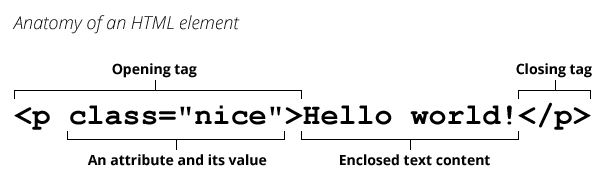
<img src="https://developer.mozilla.org/en-US/docs/Glossary/Element/anatomy-of-an-html-element.png" alt="Example: in <p class=&#x22;nice&#x22;>Hello world!</p>, &#x27;<p class=&#x22;nice&#x22;>&#x27; is an opening tag, &#x27;class=&#x22;nice&#x22;&#x27; is an attribute and its value, &#x27;Hello world!&#x27; is enclosed text content, and &#x27;</p>&#x27; is a closing tag." height="181" width="609">

Elements and [tags](https://developer.mozilla.org/en-US/docs/Glossary/Tag) are *not* the same things. Tags begin or end an element in source code, whereas elements are part of the [DOM](https://developer.mozilla.org/en-US/docs/Glossary/DOM), the document model for displaying the page in the [browser](https://developer.mozilla.org/en-US/docs/Glossary/Browser).

<table><thead><tr><th>Functions</th><th>Documentation</th><th data-hidden></th></tr></thead><tbody><tr><td>getElementById</td><td><a data-mention href="/websitecreator/luascript/dom/elements/getelementbyid">getElementById</a></td><td></td></tr><tr><td>getElementsById</td><td><a data-mention href="/websitecreator/luascript/dom/elements/getelementsbyid">getElementsById</a></td><td></td></tr><tr><td>querySelector</td><td><a data-mention href="/websitecreator/luascript/dom/elements/queryselector">querySelector</a></td><td></td></tr><tr><td>querySelectorAll</td><td><a data-mention href="/websitecreator/luascript/dom/elements/queryselectorall">querySelectorAll</a></td><td></td></tr><tr><td>appendChild</td><td><a data-mention href="/websitecreator/luascript/dom/elements/appendchild">appendChild</a></td><td></td></tr><tr><td>insertBefore</td><td><a data-mention href="/websitecreator/luascript/dom/elements/insertbefore">insertBefore</a></td><td></td></tr><tr><td>removeChild</td><td><a data-mention href="/websitecreator/luascript/dom/elements/removechild">removeChild</a></td><td></td></tr><tr><td>insertAttribute</td><td><a data-mention href="/websitecreator/luascript/dom/elements/insertattribute">insertAttribute</a></td><td></td></tr><tr><td>removeAttribute</td><td><a data-mention href="/websitecreator/luascript/dom/elements/removeattribute">removeAttribute</a></td><td></td></tr><tr><td>cloneNode</td><td><a data-mention href="/websitecreator/luascript/dom/elements/clonenode">cloneNode</a></td><td></td></tr></tbody></table>


# getElementById

The method **`getElementById()`** returns the first Element within the element that matches the specific ID

```javascript
elem.getElementById("id") // Returns the FIRST element with the ID of id
```


# getElementsById

The method **`getElementsById()`** returns all Elements within the element that matches the specific ID

```javascript
elem.getElementsById("id") // Returns ALL element with the ID of id
```


# querySelector

The method **`querySelector()`** returns the first Element within the element that matches the specified selector, or group of selectors. If no matches are found, `null` is returned.

Querys

<table><thead><tr><th>Symbol</th><th>Query</th><th data-hidden></th></tr></thead><tbody><tr><td>#</td><td>id</td><td></td></tr><tr><td>.</td><td>class</td><td></td></tr><tr><td>&#x3C;blank></td><td>tag</td><td></td></tr></tbody></table>

Example

```javascript
elem.querySelector("#id") // Returns the FIRST element with the ID of id
```

```javascript
elem.querySelector(".id") // Returns the FIRST element with the className of id
```

```javascript
elem.querySelector("label") // Returns the FIRST element that is a LABEL
```


# querySelectorAll

The method **`querySelectorAll()`** returns all Elements within the element that matches the specified selector, or group of selectors. If no matches are found, `null` is returned.

Querys

<table><thead><tr><th>Symbol</th><th>Query</th><th data-hidden></th></tr></thead><tbody><tr><td>#</td><td>id</td><td></td></tr><tr><td>.</td><td>class</td><td></td></tr><tr><td>&#x3C;blank></td><td>tag</td><td></td></tr></tbody></table>

Example

```javascript
elem.querySelectorAll("#id") // Returns ALL element with the ID of id
```

```javascript
elem.querySelectorAll(".id") // Returns ALL element with the className of id
```

```javascript
elem.querySelectorAll("label") // Returns ALL element that are a LABEL
```


# appendChild

The **`appendChild()`** method adds a Element to the end of the list of children of a element.

**Example**

<pre class="language-lua"><code class="lang-lua">local name = window.input("What is your name?","My name is ...")
<strong>local elm = document.createNode("p",{style="color:red"},string.format("Welcome %s",name))
</strong>document.querySelector("body").appendChild(elm)
</code></pre>


# insertBefore

The **`insertBefore()`** method adds a Element to the end of the list of children of a element.

**Example**

<pre class="language-lua"><code class="lang-lua">local name = window.input("What is your name?","My name is ...")
<strong>local elm = document.createNode("p",{style="color:red"},string.format("Welcome %s",name))
</strong>document.querySelector("body").insertBefore(elm,1) -- Inserts at the front
</code></pre>


# removeChild

The **`removeChild()`** method removes a Element with it's index

**Example**

```lua
document.querySelector("body").removeChild(1)
```


# insertAttribute

The **`insertAttribute()`** method adds a attribute to a element

**Example**

```lua
document.querySelector("body").insertAttribute("id","id 1")
```


# removeAttribute

The remov&#x65;**`Attribute()`** method removes a attribute from a element

**Example**

```lua
document.querySelector("body").removeAttribute("id")
```


# cloneNode

The **`cloneNode()`** method clones the current element and returns it

**Example**

```lua
local elm = document.querySelector("body").querySelector("#clone").cloneNode()
document.querySelector("body").appendChild(elm)
```


# Window

The **`Window`** interface represents a window containing a [DOM](https://developer.mozilla.org/en-US/docs/Glossary/DOM) document; the `document` property points to the [DOM document](https://developer.mozilla.org/en-US/docs/Web/API/Document) loaded in that window.


# Location

**`location`** is a read-only property which returns functions with information about the current location of the document.


# reload

The **`reload()`** method of the Location interface reloads the current URL, like the Refresh button.

This reload the page instantly

Example

```lua
window.location.reload()
```


# to

The **`to()`** method of the Location interface redirects the user to another page

Example

```lua
window.location.to(URL)
```

```lua
window.location.to("https://rhodium.com")
```


# teleport

{% hint style="warning" %}
This will not instantly teleport the player. A popup will appear asking if the player want's to be teleport to the place.
{% endhint %}

The **`teleport()`** method of the Location interface teleports the user to another experience

Example

```lua
window.location.teleport(GameID)
```

```lua
window.location.teleport(14916849806)
```


# localStorage

The **`localStorage`** read-only property of the window interface allows you to read and write to the browser storage.&#x20;


# setKey

The **`setKey()`** method of the localStorage interface saves a key with it's value in the browser storage

Example

```lua
window.localStorage.setKey(key,value)
```

```lua
window.localStorage.setKey("session","93b21393-3dfb-428c-b6c0-2ee3c8018a6f")
```


# getKey

The **`getKey()`** method of the localStorage interface gets the saved data stored with the key name

Example

```lua
window.localStorage.getKey("session") --> "93b21393-3dfb-428c-b6c0-2ee3c8018a6f"
```


# deleteKey

The **`deleteKey()`** method of the localStorage interface removes a key from the browser storage

Example

```lua
window.localStorage.deleteKey("session")
```


# getKeys

The **`getKeys()`** method of the localStorage interface gets every single key and it's value

Example

```lua
window.localStorage.getKeys() --> {session = "93b21393-3dfb-428c-b6c0-2ee3c8018a6f"}
```


# alert

`window.alert()` instructs the browser to display a dialog with an optional message, and to wait until the user dismisses the dialog.

Examples

```lua
window.alert(Text)
```

```lua
window.alert("Hello! This is an alert")
```


# input

`window.input()` instructs the browser to display a dialog with an optional message prompting the user to input some text, and to wait until the user either submits the text or cancels the dialog.

Examples

```lua
window.input(Text, Placeholder)
```

```lua
window.input("What is your name?", "My name is ...")
```


# delay

Delay is just LUA native wait

Delay takes **1** numeric argument called seconds. Delay yields the entire thread until the time is completed.

```lua
print("Hello!")
delay(1) -- wait 1 second
print("Hello after 1 second") -- Prints after 1 second
```


# setTimeout

setTimeout is just LUA native `delay` expect it does not yield the current running thread

setTimeout takes **2** arguments, the function and numeric timeout in seconds

<pre class="language-lua"><code class="lang-lua"><strong>local Age = 18
</strong><strong>print("You are " .. Age .. " years old!")
</strong>setTimeout(function()
    Age = 23
    print("You are now " .. Age .. " years old!")
end, 5)
print("You are still " .. Age .. " years old!")
</code></pre>


# setInterval

setInterval is just LUA native `delay` expect it runs infinitely every timeout

setInterval takes **2** arguments, the function and numeric timeout in seconds

setInterval **returns** the **interval timeout ID,** you can use this to stop the interval using [clearInterval](/websitecreator/luascript/clearinterval)

```lua
local Age = 1
setInterval(function()
    Age = Age + 1
    print("You are " .. Age .. " years old")
end, 5) -- every 5 seconds this will print the current Age
```


# clearInterval

clearInterval stops a currently running Interval using it's ID

clearInterval takes **1** arguments, the timeout ID

```lua
local Age = 1
local interval = setInterval(function()
    Age = Age + 1
    print("You are " .. Age .. " years old")
end, 5) -- every 5 seconds this will print the current Age

delay(20) -- wait 20 seconds
clearInterval(interval) -- stop the current running interval
print("Final age " .. Age)
```


# MarketPlace

MarketPlace is responsible for websites transactions.

MarketPlace has methods that fetch information about developer products or prompt transactions popup

Their are various functions to help you monetize your website


# promptGamepass

Prompts the user to purchase a [gamepass](https://create.roblox.com/docs/production/monetization/game-passes) with the given gamePassId.

```lua
marketplace.promptGamepass(gamePassId: Number): void
```


# promptProductPurchase

Prompts a user to purchase a [developer product](https://create.roblox.com/docs/production/monetization/developer-products) with the given productId.

`equipIfPurchase` defaults to true if argument is not provided

```lua
marketplace.promptProductPurchase(productId: Number, equipIfPurchased: Boolean): void
```


# promptPurchase

Prompts a user to purchase an item with the given assetId.&#x20;

`equipIfPurchase` defaults to true if argument is not provided

```lua
marketplace.promptProductPurchase(assetId: Number, equipIfPurchased: Boolean): void
```


# hasGamepass

Returns true if the player with the given [UserId](https://create.roblox.com/docs/reference/engine/classes/Player#UserId) owns the [pass](https://create.roblox.com/docs/production/monetization/game-passes) with the given gamePassId, not to be confused with an asset ID.

```lua
marketplace.hasGamepass(gamePassId: Number): Boolean
```


# hasAsset

Returns whether the inventory of the given player contains an asset

```lua
marketplace.hasAsset(assetId: Number): Boolean
```


# purchaseSuccess

This event fires when a purchase dialog for a [pass](https://create.roblox.com/docs/production/monetization/game-passes) is closed. It fires as the dialog closes, when the player presses "Cancel" at the prompt or "OK" at the success/error message.

<pre class="language-lua"><code class="lang-lua"><strong>marketplace.purchaseSuccess(callbackFunction: function): void
</strong>
marketplace.purchaseSuccess(function(<a data-footnote-ref href="#user-content-fn-1">player: PlayerObject</a>, purchaseType: Enum, wasPurchase: Boolean)
    -- Enum.PurcahseType GamePass | MemberShip | Product
    -- wasPurchase only returns for GamePasses and Product not MemeberShip
    if purcahseType == Enum.PurcahseType.GamePass then
        print(player.Name .. " purchased a gamepass")
    elseif purcahseType == Enum.PurcahseType.Product then
        print(player.Name .. " purchased a product")
    else
        print(player.Name .. " purchased a membership")
    end

end)
</code></pre>

[^1]: [Player](/websitecreator/luascript/player)


